1.1 Architecture
Robot Framework Browser library is a Python library that uses Playwright NodeJS and connects to it via the gRPC protocol.
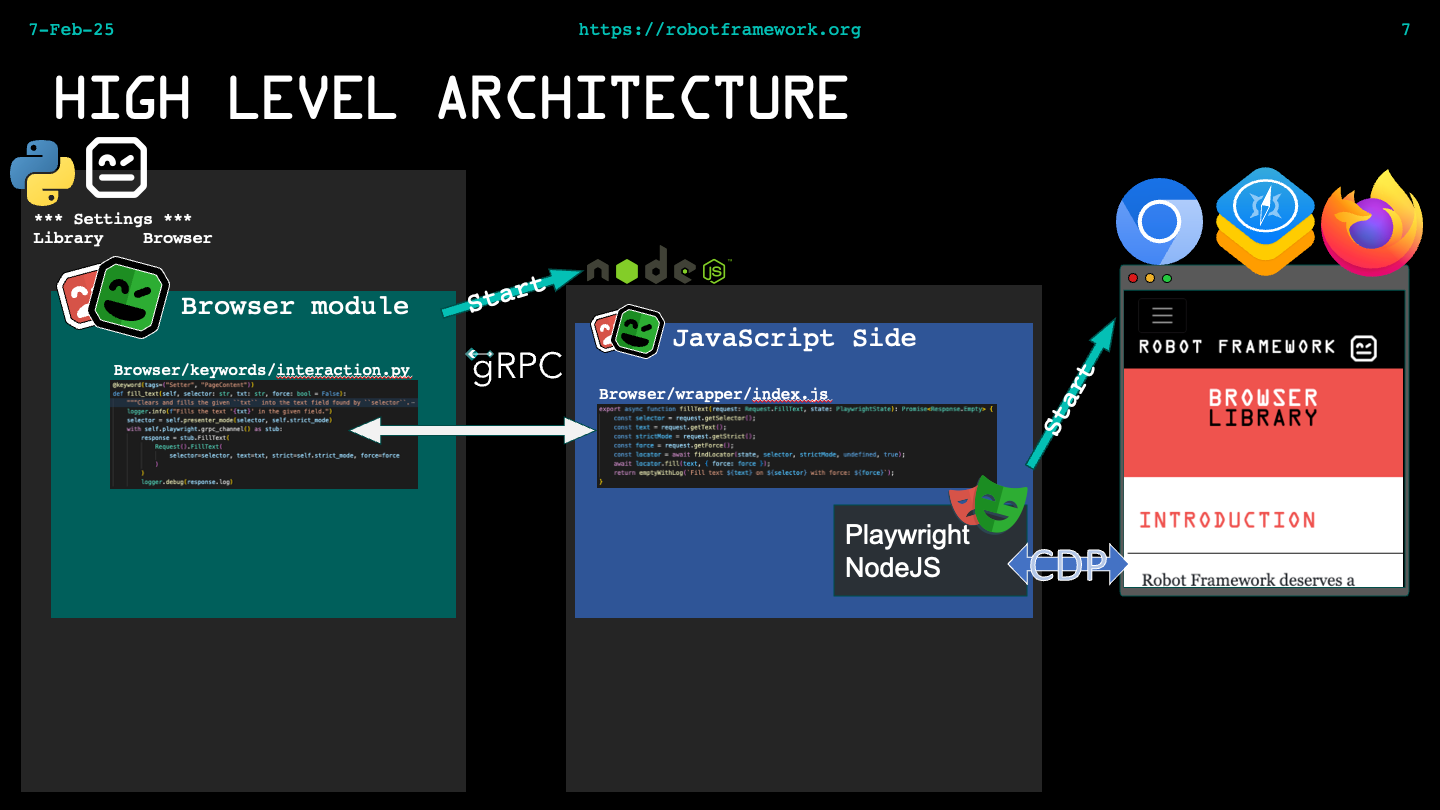
1.1.1 Interpreter environment management
Currently, there are several good ways to manage your Python environment, for example: uv, pyenv or venv. There are also many other ways to manage your Python environment, and each has its pros and cons. If you are using Python in a company-controlled network, it might come with its own set of rules and limitations. Because there are so many good ways to manage your environment, it is hard to give a single set of recommendations that fits everyone.
It is also recommended to use a version manager for NodeJS; see n or nvm for Linux and macOS. For Windows, see nodist or nvm-windows.
The main point of all the tooling is: Never install dependencies into the system Python In almost all cases, you need to test with multiple versions of Python, even when you use one repository for all your test automation. You should regularly update your Python to the latest patched release and, at least once a year, you should update your Python major version.
Why use a Python virtual environment (venv)? venv supports creating lightweight "virtual environments", each with its own independent set of Python packages installed in its site directories. Using venv is handy when there are multiple projects using different Python dependencies.
1.1.2 Installation strategies
There are two different ways to install Browser library:
- Without NodeJS
- With NodeJS
The former is the recommended approach because it is (most likely) simpler: the user does not need to install NodeJS. With this installation method, it is possible to install the NodeJS dependencies as a precompiled Python wheel package called BrowserBatteries, for example with pip or another Python package manager. BrowserBatteries contains the NodeJS binary, all the NodeJS dependencies, and an entry point to start the internal gRPC server compiled as a single executable.
The downside of this installation is that the Browser project does not provide the BrowserBatteries package for every possible OS and CPU architecture. In particular, some Linux distributions might use a version of gcc that we do not support.
Another downside is that BrowserBatteries contains only dependencies that are needed to run Browser library. Users might have dependencies which are not included and therefore a user might want to use an installation with NodeJS.
The other option is to install with NodeJS. The advantage of this method is that, users can install extra NodeJS dependencies and choose the OS more freely (BrowserBatteries is provided with only a handful of OS and CPU combinations) because if OS supports Python and NodeJS, it is very likely that it is possible to run Browser library in it.
1.1.3 Binary structure
Regardless of the installation method (with or without NodeJS), the installation is always
done in the Python environment, for example: .venv/lib/python3.14/site-packages/Browser/,
but this is just an example from my environment. The NodeJS dependencies (regardless of the
installation method) are, by default, placed in the Browser/wrapper directory. The Playwright
browser binaries installation location (for example, Chrome for testing) can be managed with
the PLAYWRIGHT_BROWSERS_PATH environment variable. See more details in the Playwright
documentation: https://playwright.dev/docs/browsers#managing-browser-binaries
1.1.4 Install
As discussed above, there are two ways to install the Browser library, with or without NodeJS. Both approaches have their pros and cons, and it depends on the user's needs which one to take. It is recommended to start with the BrowserBatteries installation method. If the user has special needs (for example related to the OS), then use the installation that uses NodeJS.
1.1.4.1 Install without NodeJS
Install the BrowserBatteries Python package first:
> pip install robotframework-browser-batteries
This will install all the Python dependencies, including the Browser library and the precompiled GRPC server.
If the user does not have a Chromium-based browser installed, or needs to use Firefox or WebKit
browser binaries, then the user needs to install Playwright browser binaries:
> rfbrowser install
This will download only the Playwright browser binaries.
rfbrowser install is not mandatory. For example, if the user wants to use only a Chromium-based browser
like Edge in testing and Edge is already installed, the user can skip the rfbrowser install command.
If you do not need all browser binaries installed, it is possible to install only selected browser
binaries. For example, rfbrowser install firefox will install firefox binaries, but not webkit and
chromium.
1.1.4.2 Install with NodeJS
Install the Browser library Python package first:
> pip install robotframework-browser
This will install all required Python dependencies. Then install NodeJS dependencies with:
> rfbrowser init
The rfbrowser init is mandatory, because Browser library does not work without installing
the NodeJS dependencies. If you do not need all browser binaries installed, it is
possible to install only selected browser binaries. Example rfbrowser init chromium will install chromium
binaries, but not webkit and firefox.
1.1.4.3 Where is log from installation
By default, installation is logged to the console and to the site-packages/Browser/rfbrowser.log file.
Please remember the last ten rfbrowser commands are saved by
rotating the log file. After ten commands, log files are
overwritten.
1.1.4.4 How to manage browser binaries in CI
Use rfbrowser init --skip-browsers to install all NodeJS dependencies, except the Playwright browser
binaries. Playwright documentation,
managing browser binaries
provides instructions on how to install browser binaries in a custom location, for example in Bash with:
PLAYWRIGHT_BROWSERS_PATH=$HOME/pw-browsers npx playwright install
Before running Robot Framework tests, set the $PLAYWRIGHT_BROWSERS_PATH environment variable value
to the path where browser binaries are installed. Environment variable needs to be set before running robot
command, for example in Bash: PLAYWRIGHT_BROWSERS_PATH=$HOME/pw-browsers.
Installing browser binaries only once and in an external location shortens installation considerably. Also, a CI environment can contain multiple installations of the Browser library; this saves disk space.